Price alerts in neon invest: Stay informed
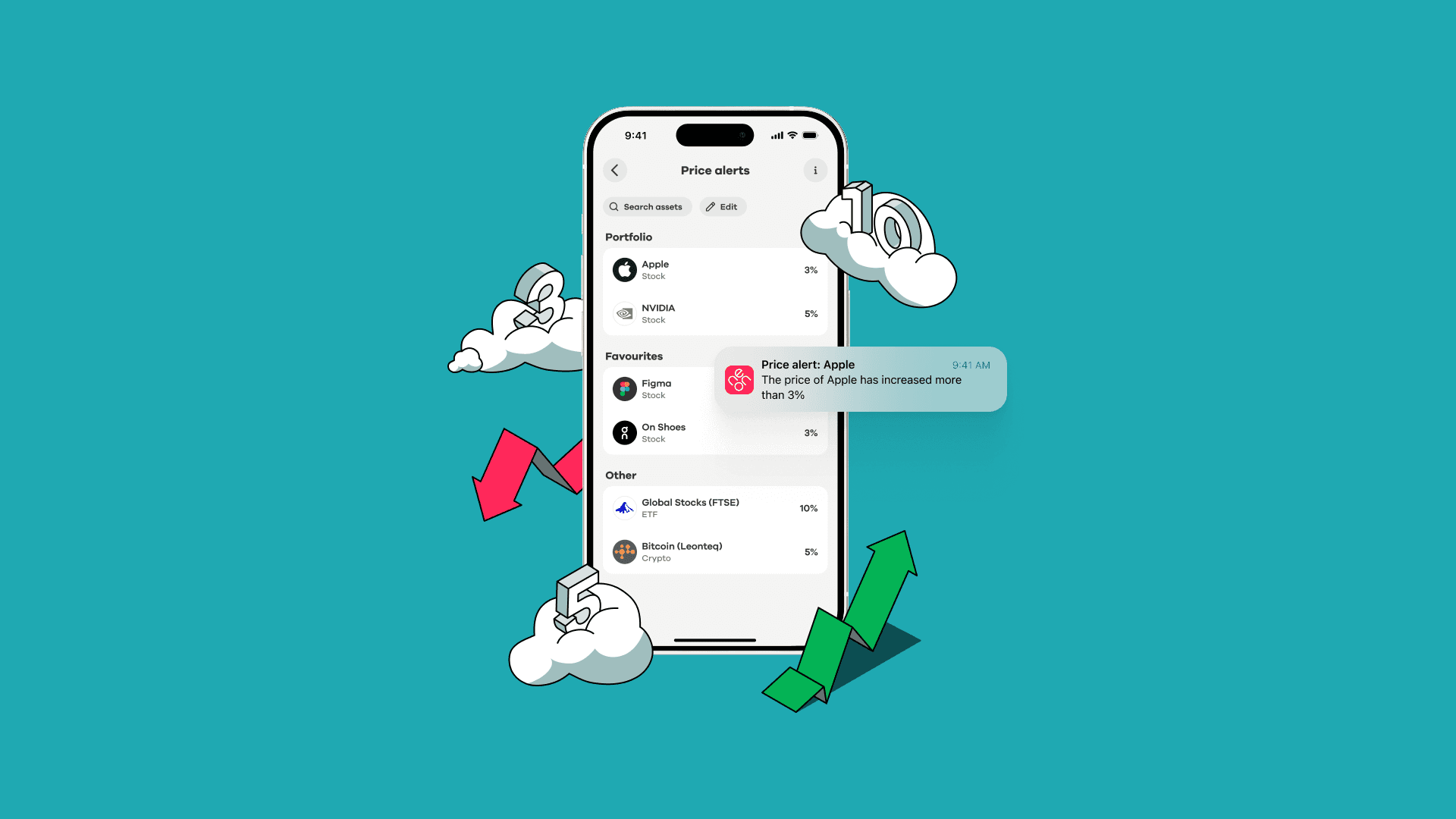
If you invest in stocks or ETFs, you’ve probably asked yourself: How can I stay up to date on market movements of my assets without checking my portfolio all the time? Price alerts in neon invest are one of the simplest answers. They notify you when an asset moves significantly, so you don’t need to constantly watch the market and check your portfolio a hundred times a day.
At neon, we have integrated price alerts into neon invest to help you track the assets that matter to you without overwhelming you with noise. But like any investing tool, price alerts work best when you understand both their benefits and their limits.
This guide explains:
What price alerts are
Why to use price alerts and who they’re for
How price alerts work in neon invest
Practical tips on how to use them
What are price alerts?
A price alert is a notification that tells you when a stock or ETF moves beyond a certain threshold that you can set. Instead of constantly checking your portfolio, the system – in your case, the neon app – monitors the market for you.
Think of it like having your own Waylon Smithers. In The Simpsons, Smithers is Mr. Burns' ever-attentive assistant – always watching, always informed, ready to whisper in his boss's ear the moment something important happens.
Price alerts work the same way: you decide which assets matter and how much movement is worth your attention, and then the app taps you on the shoulder when that moment arrives. «Excuse me, sir. Your Apple share has risen by 3% since yesterday.» You stay informed without having to watch the market yourself.
Price alerts: why to use them and who they are for
Price alerts are a good fit if you want to stay informed without checking your portfolio every day. They save you time, reduce the nagging fear of missing something important, and can support a clear investment strategy – keeping you aware of significant moves so you can decide whether to act, hold, or simply stay informed.
That said, they're not for everyone. If you already enjoy checking your portfolio regularly, alerts won't add much. And if market ups and downs tend to make you anxious or trigger impulsive decisions, more notifications may do more harm than good – research backs this up. A 2021 study in the Journal of Financial Economics found that attention-triggering tools increase trading activity and risk-taking, and a 2023 article in The Irish Times summarised research showing that frequent alerts can lead to more impulsive trading and lower long-term returns.
The key insight: price alerts themselves are neutral. Used as a calm awareness tool, they help you stay on top of significant movements without the noise. Used reactively, they can nudge you toward overtrading. So if you know you tend to act first and think later when markets move, it might be worth skipping alerts – or setting a high threshold like 10% to filter out day-to-day fluctuations.
How price alerts work in neon invest
We've designed price alerts to focus on meaningful movements, not daily noise. Alerts are threshold-based: you choose a percentage, and you get notified when an asset moves by that amount relative to its most recent end-of-day (EOD) closing price.
It's worth understanding what «end-of-day price» means here. Every trading day, each asset has a closing price, which means the last price at which it traded before the market closed. That's the baseline your alert is measured against. So if your ETF closed at 100 CHF yesterday, a 5% alert will trigger if it reaches 105 CHF or drops to 95 CHF today.
Importantly, this baseline updates every day. If your ETF's EOD price is 100 CHF when you set the alert, and a month later it's been gradually climbing to 120 CHF, your 5% alert is now calculated from 120 CHF – not from the original 100 CHF. The alert always reflects where the asset is now, not where it was when you first set it up.
With neon invest, you have three available thresholds:
3%
5%
10%
Here's a quick example of how it works in practice: You set a 10% alert on the Global Stocks (FTSE) ETF on Monday. The market closes at 100 CHF. On Tuesday, the price climbs to 110 CHF and you get a notification. If it then dips back to 105 CHF the same day, no second alert fires. This prevents you from being bombarded by notifications every time the price twitches.
But if the price keeps climbing and hits 121 CHF that same Tuesday, you'll get a second alert, because that's 10% above the current day’s new baseline of 110 CHF. At the end of each trading day, the baseline resets to the closing price. So from Wednesday onwards, your alert only triggers at ±10% from the EOD price on Tuesday.
How to set a price alert in neon invest
Step 1: Open the Invest tab.
Step 2: Tap the bell icon in the top-right corner.
Step 3: Select assets that are already in your portfolio or from your favourites. If you don’t have assets in your portfolio or in favourites yet, you can look for assets by using the search button.
Step 4: Choose a threshold (3%, 5%, or 10%) for each asset.
That’s it. Now you’ll now receive notifications on your chosen assets when movements occur.
Practical tips: how to use price alerts wisely
Based on behavioural finance research, here are best practices for price alerts:
Price alerts are for awareness: Treat alerts as signals to review your strategy, not act immediately.
Combine alerts with a long-term plan: Price alerts work best when tied to specific investment goals.
Avoid monitoring too many assets: Focus on what truly matters to your portfolio to not be overwhelmed by too many alerts.
💡 Key takeaway: Price alerts are a powerful information tool and should not be an investing strategy. They help you stay informed of significant market movements, and save you time by reducing your monitoring effort.
Try price alerts in neon invest
With neon invest, you can set personalised alerts in seconds and keep track of your assets without constant monitoring. Open the neon app, set your first alert in under a minute, and let Waylon Smithers do the watching. *Ahem, excuse us, we meant the neon app, of course: let the neon app keep watch for you.